 CONTEXT, CONNECTED.
Carry the conversation forward
Move from a button-driven bot or AI answer to a human queue. Agents can see bot-handled conversations and take over when judgment or follow-up is needed.


Bring WhatsApp conversations into the heart of your service operation. Connect self-service, AI assistance and human agents with contact records, cases and conversation history inside Microsoft Dynamics 365.
Arabic & English. Rich media. A clear handoff to people.
1Wap brings the message, the responsible agent and the relevant Dynamics 365 records into one communication center. Support service requests across industries without treating chat as a separate inbox.
Move from a button-driven bot or AI answer to a human queue. Agents can see bot-handled conversations and take over when judgment or follow-up is needed.
Match the contact by phone, review previous cases, create a new case and link selected chat media without leaving the agent workspace.
Queue counts, ownership, waiting-time indicators, internal notes and performance reporting keep the service operation connected.
Built around your service model. Configure categories, bilingual responses, welcome messages, agent access and waiting-time thresholds around the teams and services you operate. Screens show representative design data, not a customer deployment or achieved results.
Self-service and human service work together. The conversation’s mode determines who replies, while Dynamics 365 retains the service record.
A person writes to your WhatsApp Business number. The conversation is recorded and a language-appropriate menu can guide categories, FAQs and status enquiries.
Configured menus and optional AI question answering provide assistance. A request for a person, escalation or an error can move the conversation to the agent queue.
An agent accepts or takes over before replying. The bot stops responding on the human-handled thread; the configured welcome message can introduce the agent.
Reply, create a case, attach selected evidence and resolve the conversation with an outcome. History remains available, and the latest resolved conversation can be reopened.
One owner at a time. Other agents can inspect a handled conversation without sending competing replies. Resolving closes that conversation; a later inbound message starts a new bot conversation, preserving the previous history.
A three-zone workspace combines the queue, the conversation and an action panel. The right information stays close to the reply.
New, Bot, Mine and All views expose live counts and searchable conversations. Waiting-time colors help flag conversations that need a first response.
Bring text, photos, video clips, voice notes, PDF documents and shared location pins into the chat stream, with delivery-status updates and system events.
Match a Dynamics contact by phone, create or link a contact when needed, and open a case from the conversation with editable details.
Use categorized bilingual quick responses, personal replies and optional attachments. Insert contact or case placeholders into the message draft.
Review previous conversations through summaries and full transcripts. Internal notes keep useful team context separate from messages sent on WhatsApp.
Switch between Arabic and English with a mirrored right-to-left layout. Customer messages keep their original direction and language.
AI is designed to help with triage, context and drafting, not to bypass agent review or service permissions. Features depend on the approved configuration and available Azure AI services.
Generate media descriptions, voice transcripts, document text and structured conversation summaries. Surface issue, location, request, context and sentiment as assistance that can be checked against the original conversation.
Use a suggested rewrite to polish a reply, or retain the original. Case prefills remain editable; an agent decides what to save and send.
The AI question-answering design uses read-only CRM tools scoped to the person’s conversation, content filters and turn/token budgets. A human request, tool failure or escalation routes the conversation to people.
AI summaries and sentiment are indicative, not guaranteed judgments. Knowledge content, permissions, evaluation and deployment-region decisions are part of implementation.
A dedicated administration workspace gives authorized administrators control over the people and content behind the communication center.
Add eligible Dynamics users to WhatsApp access; manage active status, agent or admin roles, availability, language coverage and bilingual nicknames.
Maintain Arabic and English quick responses, optional files and the single welcome message. Preview its language versions, choose an agent nickname and turn automatic sending on or off.
View Today, Last week and Last month periods for conversation volume, first response time, handle time, resolved rate and waiting-time breaches.
Explore breakdowns by language, service category, outcome, sentiment and received media, alongside per-agent figures. Dashboard values in the screenshots are illustrative, not measured results.
Explore 7 screens from the agent and administrator interfaces. Select a screen to inspect its complete layout and task context.
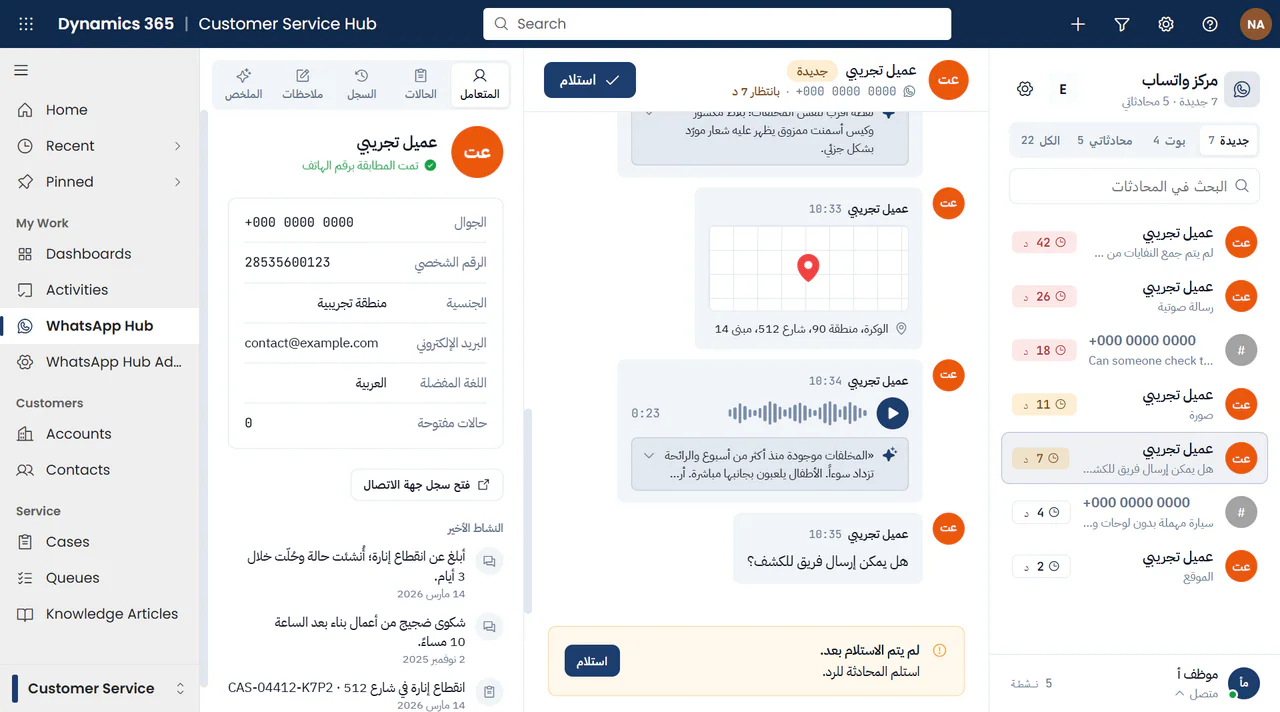
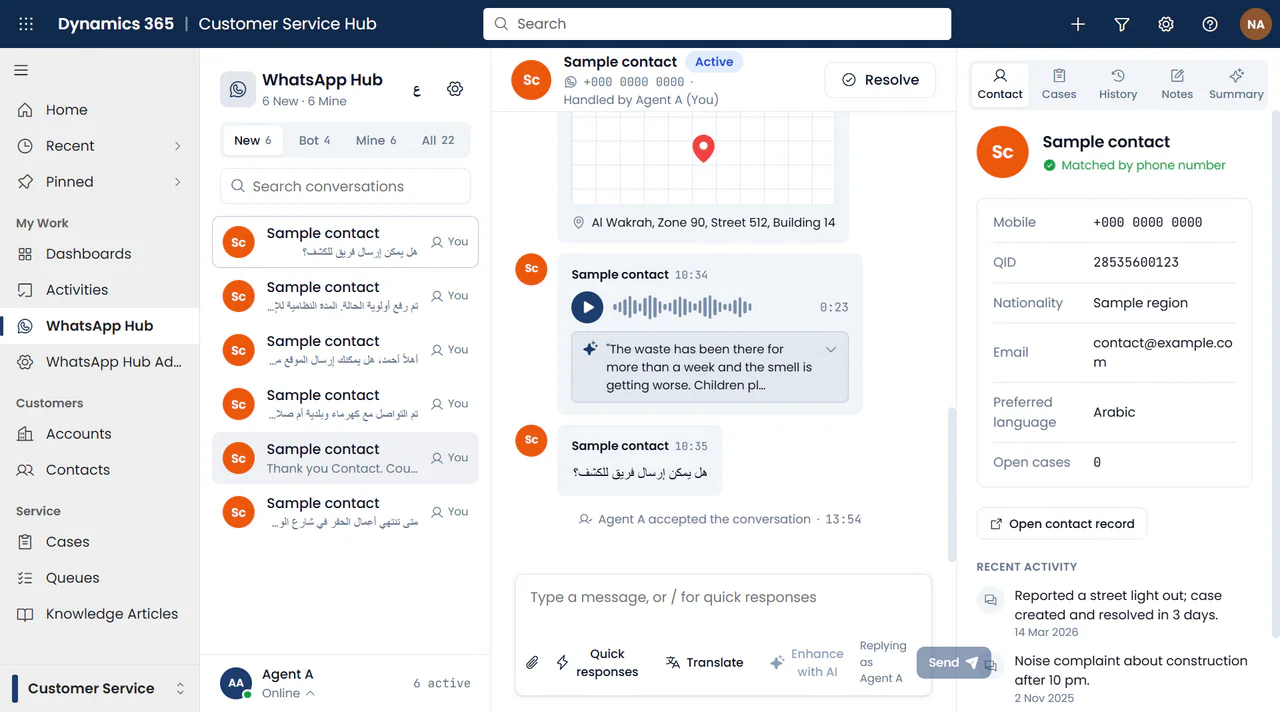
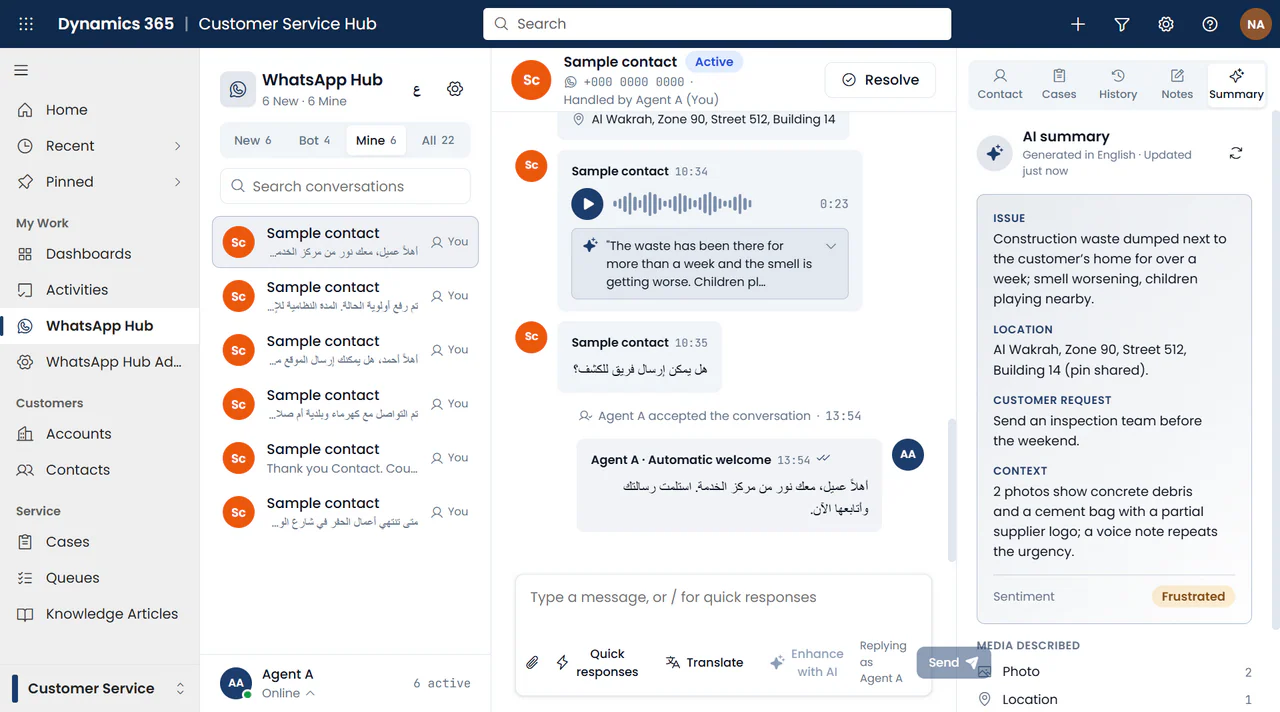
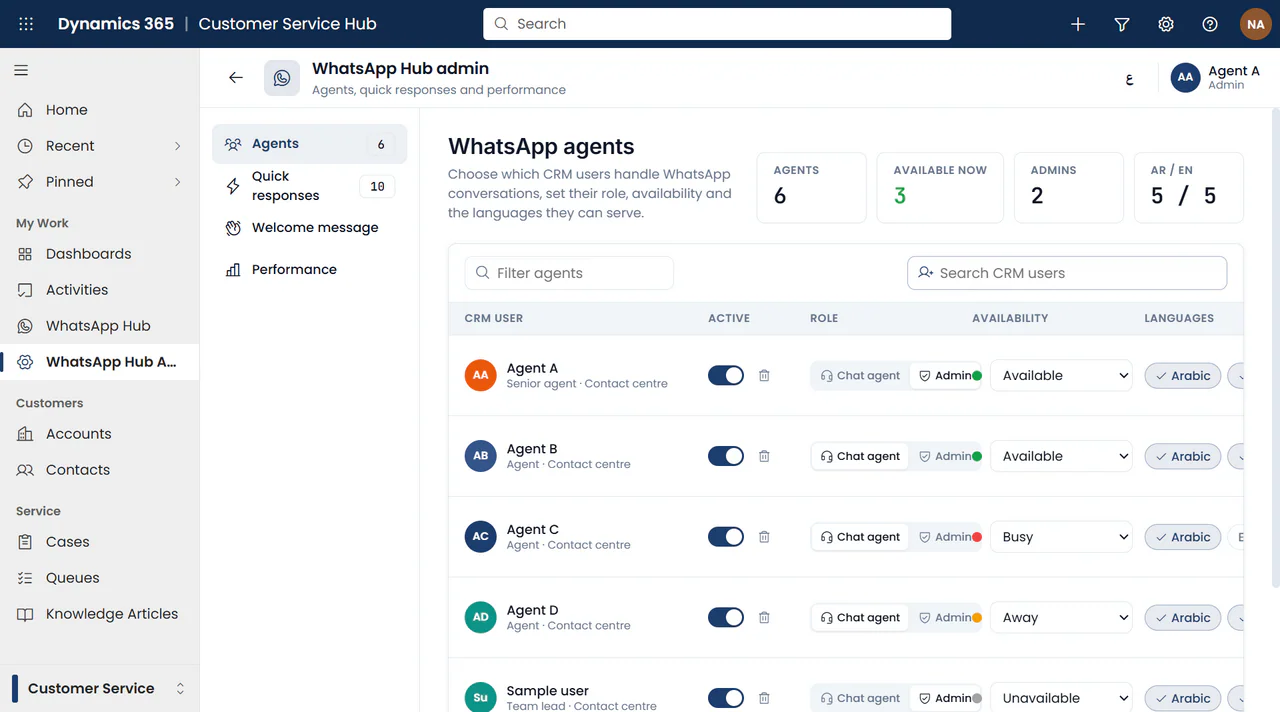
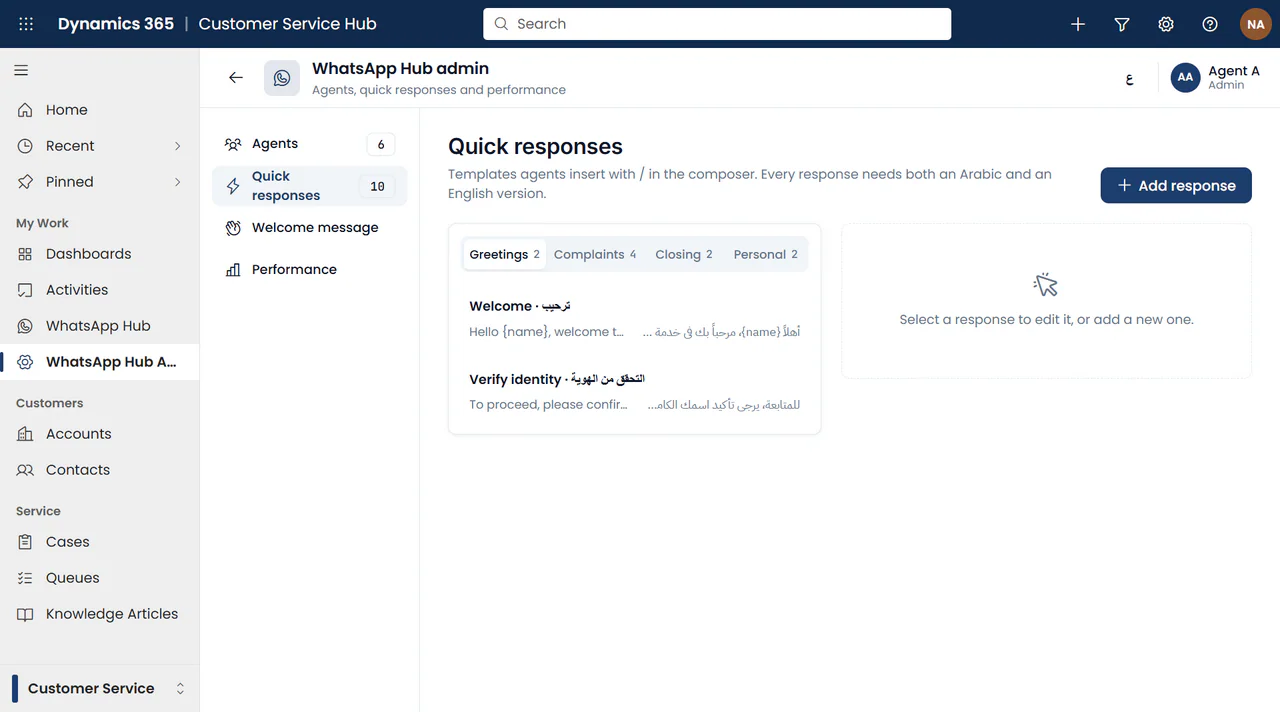
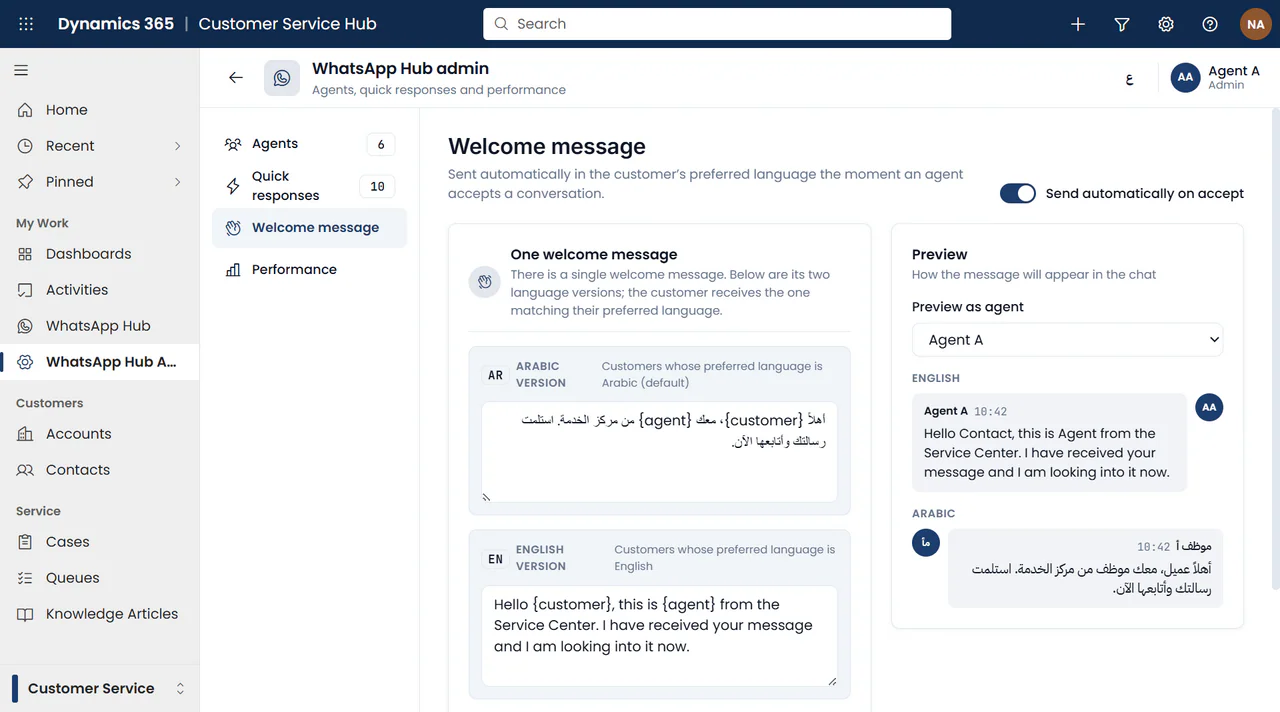
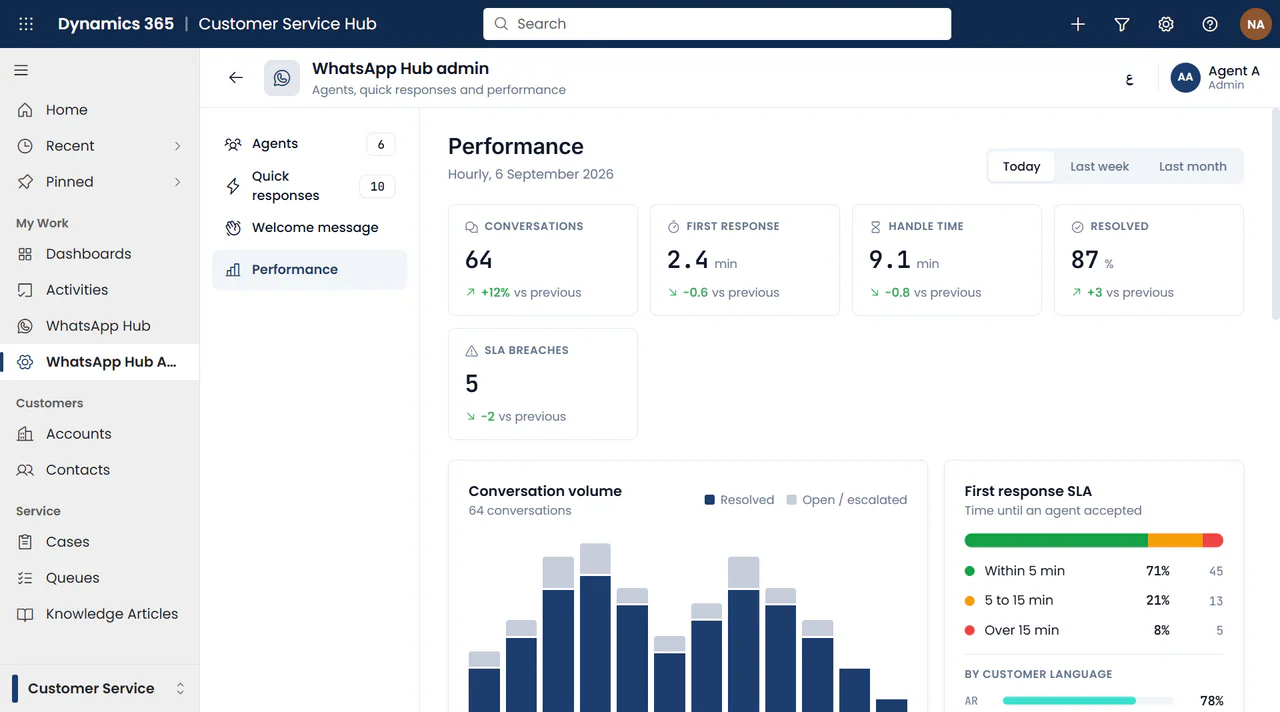
Interface design views, not a live deployment. Identifying text has been replaced with neutral sample data. AI outputs, cases and performance figures are illustrative; capabilities depend on the approved implementation.
1Wap connects a WhatsApp channel to Dynamics 365 Customer Service through an Azure-hosted gateway. Infrastructure and operating decisions are scoped to your requirements.
Agent and admin workspaces sit inside the Customer Service experience. Dataverse is the system of record for conversations, messages, media references, summaries, internal notes and service links.
The WhatsApp channel uses Twilio Programmable Messaging and Studio, with a provider adapter separating channel APIs from business logic. An Azure App Service gateway coordinates inbound messages, ownership, outbound delivery and background work.
Azure Blob Storage holds media, Azure OpenAI and Document Intelligence support configured AI features, and SignalR supports live updates. Entra ID, managed identities, role checks, short-lived media access and malware scanning form part of the security design.
WhatsApp’s session policy applies: free-form replies follow the 24-hour customer-message window; messages outside it require approved templates. Licensing, sender registration, template approval, security controls, retention, AI-region availability and browser permissions must be confirmed for your implementation. No certification, service-level guarantee or fixed deployment capacity is implied.
Start with the services you want to support, then agree the channel, team responsibilities, data policies and integrations.
Yes. Bot conversations are visible in the queue, and an agent can take over before replying. A human-handled thread stops receiving bot replies. Other agents can inspect it without replying as a competing owner.
Yes. A contact must exist before case creation. The case form can use an editable AI-assisted title/description, the shared location pin and selected chat media; previous cases remain visible beside the conversation.
1Wap defaults to Arabic and supports an English switch with mirrored layout. Quick responses, welcome messages and AI-generated interface content have language versions; original messages retain their language. Real-time translation is not included in the current release.
No. The current release focuses on service conversations and agent work. Outbound campaigns, WhatsApp template-approval management, live voice/video calls, reporting export and supervisor barge-in are outside that scope. Video clips and voice notes are supported as message attachments, not live calls.
Confirm your Dynamics 365 Customer Service licensing, WhatsApp Business sender and provider setup, Azure environment and identity access. Agree bilingual content, agent roles, categories, waiting-time thresholds, retention and security requirements, plus any AI features and notification permissions.
Tell us about your service teams, WhatsApp touchpoints and Dynamics 365 environment. Let’s shape a communication center around the work you need to support.
Discuss 1Wap with our team Explore the portfolio