Participation without the paper trail.
Move from a purchase to a coupon and on to campaign updates through digital touchpoints. Offer printed coupons when your draw process requires them.

 PURCHASE. PARTICIPATE. POSSIBILITY.
Bring the excitement of a raffle to every shopper interaction. eRaffle connects campaign rules, purchases, digital coupons and customer conversations in one complete loyalty experience.
 eRaffleTHE CAMPAIGN ENGINE
Interactive campaign illustration · Select a touchpoint to explore.
A raffle can create a compelling reason to visit, shop and return. eRaffle gives the campaign an operational backbone: fewer disconnected paper processes, richer customer records and a consistent experience across your venues.
Move from a purchase to a coupon and on to campaign updates through digital touchpoints. Offer printed coupons when your draw process requires them.
Connect participating malls, shops, brands and categories. Shape purchase incentives around your campaign and understand where engagement is happening.
Bring participation, shopper profiles, purchases and venue performance together in reports, Power BI dashboards and AI-assisted insight.
Designed to support traffic, engagement and repeat visits. Commercial outcomes depend on campaign design, shopper response and your operating context.
Start with the behavior you want to encourage. Then connect the rules, people and information that make participation possible, from the first purchase to the final draw.
Choose activities, dates, qualifying spend and the draw schedule.
Capture customer and purchase details through service desks or receipt photos.
Check eligibility and convert qualifying spend into coupon entitlement.
Keep entries traceable digitally, with an optional printed-coupon route.
Share campaign information, participation statements and draw dates.
Select and verify winners, then learn from campaign and venue performance.
The Dynamics 365-native rule engine turns your marketing idea into an executable campaign. Configure who can participate, how purchases translate into rewards and when each activity moves forward.
Many ways to reward.
Define spend-to-coupon ratios, minimum purchase thresholds and weighted rewards for selected store categories or tenants.
Plan several activities within a campaign, manage lifecycle dates and schedule multiple draws across a seasonal or multi-week event.
Apply demographic filters, mandatory shopper fields and exclusion lists, for example, excluding mall staff from participation.
Coordinate communication channels and event-triggered messages with the campaign’s rules, dates and customer journey.
Not every shopper starts in the same place. Give customer-service teams a streamlined entry route, and enable receipt-photo capture for a more self-service experience.
Search for a shopper using a mobile number or ID number. If the shopper is new, collect the missing profile information, then register purchase details through a role-focused interface.
Microsoft AI Builder extracts receipt text and key-value pairs from shopper-uploaded photos. Recognized receipts can feed the purchase and coupon-generation process without routine re-keying.
Recognition depends on receipt quality, template setup and validation rules. Exceptions still need an appropriate review process.
Illustration of a configured receipt-processing journey, not a live receipt scanner.
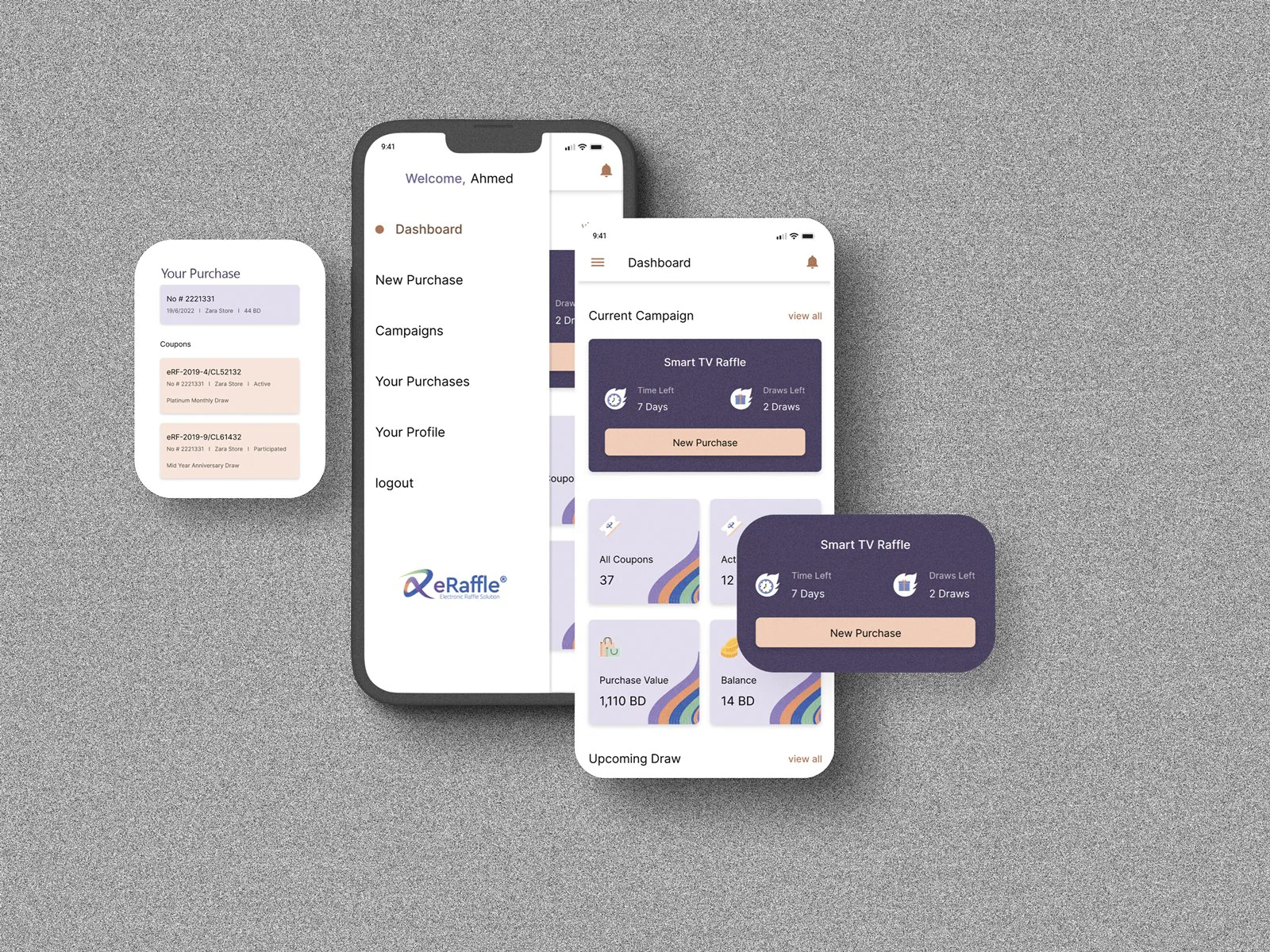
The customer mobile experience brings campaign discovery, purchase history, profile management and coupon visibility together. A shopper can follow the campaign without returning to the service desk for every update.
Give the shopper a clear view of the campaigns and draw activity they are following.
Keep purchase records and associated coupons visible in one customer experience.
Support customer information updates and a continuing campaign conversation.
Make campaign information available through a channel your customers already use. The eRaffle WhatsApp connector links shopper enquiries to participation information using the shopper’s mobile number.
Offer bilingual conversational flows. The connector supports up to five conversation steps per language; the final flow is agreed for your implementation.
Let shoppers request raffle information, draw dates and an electronic statement of purchase totals, purchase count, coupon value and coupon count.
Connect through the official WhatsApp Business API and your Meta business profile. Campaign messaging can extend to SMS and WhatsApp notifications.
Business-account setup, messaging consent, integration scope and applicable Meta messaging charges must be confirmed for your deployment.

Welcome. What would you like to know about your raffle participation?
Arabic & English flows availableSee the campaign’s participation rules, qualifying purchases and reward activities in a guided conversation.
Information is configured for your campaign.Your mobile number connects the enquiry to your participation record.
Give shoppers a clear view of scheduled draw dates and campaign activities.
Dates come from your campaign schedule, not a fixed example event.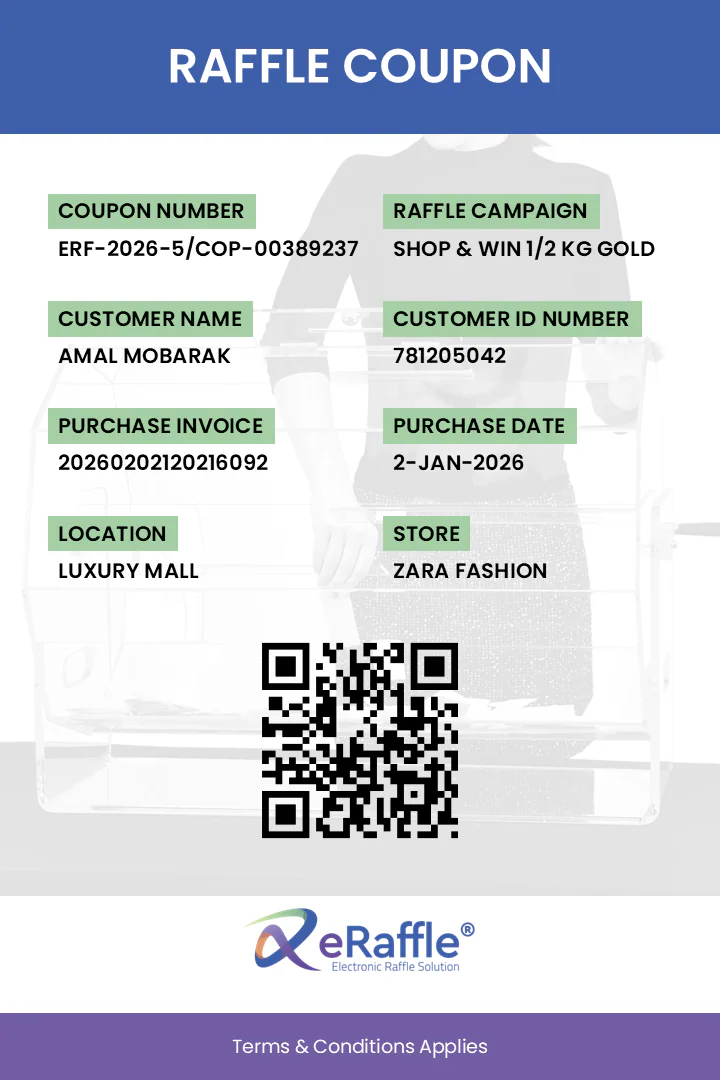 Serialised. Traceable. Verifiable.
A digital campaign does not have to mean an all-digital draw. The coupons-printing module supports manual draws when printed entries are required by your operating model or the relevant authorities.
Enter purchase details once and generate the corresponding number of printed coupons.
Retain serial-number tracking in the system, with QR-code verification supporting entry checks and fraud-protection workflows.
Support thermal-printer operation while keeping campaign data available for reporting and customer insights.
Printing and draw requirements vary by jurisdiction. The agreed campaign process must match applicable rules; software features alone do not establish compliance.
Plan single or multi-draw events with a random-picker workflow and winner-verification checks. Keep selection connected to the eligibility rules defined for your campaign.
Draw rules, approvals and supervision remain the operator’s responsibility. Random-selection functionality is not a substitute for regulatory approval or independent certification.
Extend reporting with Microsoft Power BI. Bring customer segmentation, purchase activity and venue performance into a wider view of the campaign, then use AI-assisted narratives to make the patterns easier to discuss.
Explore configured profile dimensions, first registration, retention and preferred venues. Use demographic data only within your agreed collection and privacy policies.
Review purchase count, value and frequency across campaigns and activities, not only the final coupon total.
Compare malls, shops, brands, categories, zones and floors to understand the distribution of participation and spend.
Analyze monthly, quarterly or annual trends, or define seasonal windows for Ramadan, holidays and back-to-school campaigns.
Turn raw campaign data into executive summaries, behavior patterns, anomaly detection and potential value gaps that merit a closer look.
Which stores or categories are contributing most to campaign activity?
Is a change in spend coming from more purchases, or larger purchases?
Where might high traffic and smaller basket sizes point to a missed opportunity?
Use the same campaign engine in different ways. Your activities, reward rules, channels and reporting should reflect the event you are running and the people you want to reach.
Bring participating tenants into one campaign, define qualifying spend and schedule several draws across the event. Track purchases and participation by venue while keeping shoppers informed through mobile and WhatsApp touchpoints.
Define the purchase threshold, coupon entitlement and entry period for a store or brand-led reward event. Use desk-side registration or configured receipt capture, with digital or printed coupon delivery as required.
Plan back-to-back campaigns in a dedicated environment, retain the historical picture and compare customer and venue activity over time. Use insight from past events to refine future rules and communication.
eRaffle is an add-on for Microsoft Dynamics 365 Sales or Customer Service. Deployment models cover campaign-based shared cloud and a dedicated environment for a continuous loyalty strategy.
A tenant-based environment for tactical or seasonal campaigns, with technical and operational management provided by BlueLink.
A permanent, isolated environment for back-to-back campaigns and a longer-term view of customer and campaign information.
Deployment availability, licensing, subscription terms, integrations, data handling and service scope are confirmed in your proposal. No fixed pricing is implied.
Platform and optional component licensing depend on the agreed deployment.
A successful implementation starts with the rules, roles and channels that fit your business.
Yes. The setup module supports layered activities and multi-draw events with campaign lifecycle dates and draw scheduling.
No single entry channel is assumed. The product includes role-focused customer-service registration, a shopper mobile experience and WhatsApp self-service. The channels enabled for your campaign are agreed during implementation.
Yes. The printing module generates coupon entitlement from purchase information, tracks coupon serials and includes QR verification. Confirm the physical draw and printing requirements with the relevant authorities.
The receipt-capture workflow can alert administrators for an unrecognized receipt. Template configuration, image quality and an appropriate exception-review process remain important.
No. Campaign permissions, eligibility rules, draw supervision and participant-data handling depend on local requirements. BlueLink provides compliance guidance for Bahrain; the jurisdiction and current service scope must be confirmed for your campaign.
No. This is a product-information page. The animated illustration, example chatbot responses and mobile/coupon artwork explain the experience; they do not accept entries, retrieve customer data or select winners.
YOUR NEXT CAMPAIGN STARTS WITH A CONVERSATIONTell us about your venues, campaign calendar, reward rules and customer channels. We’ll help you shape the right eRaffle setup and operating model.
Talk to an eRaffle solution expert Explore the portfolio